Hi guys!!!!
Come back with me again. I am sorry if I rarely post my blog because I have to write my thesis also. In my post today, I will explain about Hot Potatoes. Please, don't bored when I share about many tools to teach students because it is very important and useful for the teacher. If you teach your students using the old techniques and methods, it can make the students bored and become lazy. So, teacher have to find the new techniques and methods to make the students interested and make the students understand the material easily. If you confused how to find the new technique, you can find new technique from the internet, one of the example is Hot Potatoes. What is Hot Potatoes? and How to create Hot Potatoes? Please read my blog until finish.
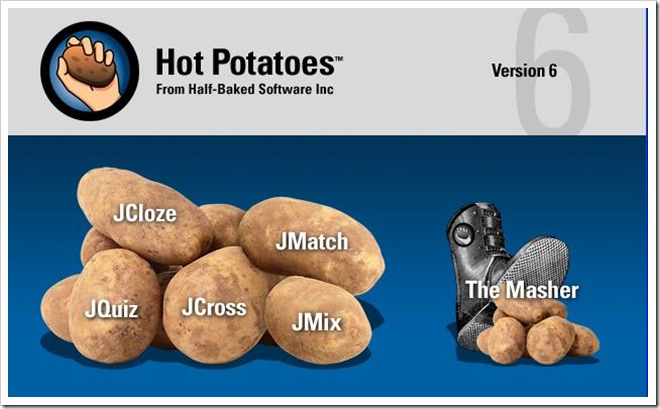
Hot potatoes is a freeware for creating quizzes. Hot potatoes includes different applications for creating multiple-choice and short-answer questions (JQuiz), matching exercises (JMatch), ordering exercises (JMix), crossword (JCross) and gap-fill exercises (JCloze).
 There are the steps how to download Hot Potatoes:
1. You will first need to download and install the Hot potatoes program on your computer. Go to the following link to download. http://hotpot.uvic.ca/index.php#downloads
2. Once installed, open the program and you should see this window. From here you can choose which type of quiz you want to make.

There are the steps how to create JMatch :
1. Click the potato labeled "JMatch"

2. In the "Exercise Title" box, type
your quiz title.
3. In the Left coloumn, you will put
the fixed items. These will be the
items that your students cannot
change.
4. In the right column, you will put
the items that your students have
to choose from. Type the
answers next to their match.
5. Refer to the sections on saving,
changing the setting on, and
publishing your quizzes in Hot
Potatoes for Mac.
Note: - Do not check the boxes next to the right column. This will make all answers appear next
to their matches, defeating the purpose of the exercise.
- Leave the "Default value in the right column". If anything is in that box, it will change all
your answers to whatever you put there.
There are the steps how to create JCloze:

1. Open your Hot Potatoes from your PC. Then choose JCloze.

2. In the "Exercise Title" box, type your quiz
title.
3. Write a paragraph and choose the word that
you want to be the gap. and click "Gap".

4. Give clue for the word.
5. If you want to add another gap words, do the
same thing as previous steps.
6. Refer to the sections on saving, changing the
setting on, and publishing your quizzes in
Hot Potatoes for Mac.

7. Finally, the JCloze will be appear as the picture below. In this exercise, the test taker should filling in the gap.
In my opinion, the benefits using Hot Potatoes are first, it is so easy to use for the teachers and students. Second, students can learn through a variety of activities that apply to many different learning styles.
Besides the benefits, this tool also have the weaknesses. One of the weaknesses is it is easier for students to cheat with hot potatoes by clicking on hint to see each letter of a word.
When I become a teacher later, I will use Hot Potatoes to teach reading and vocabulary. First I want to the students read the text two times and after that I will give the question using JMatch or if I want to teach vocabulary I will use JCross for the exercise.
Thank guys for reading my post until finish. My post will be better, if you give comment or suggestion also. so, I will wait your comment or suggestion. Thank you and GBU!!!
These are the examples of JCloze and Jmatch:


You can play JCloze and JMatch that I have created before:
- https://docs.google.com/document/d/19trvW5xOTYevEwkcluVJpOQxPFDRo6CLyfA9Disa9UA/edit
- file:///C:/Users/Compaq/Documents/Jclose.htm
- https://docs.google.com/document/d/1iY5yza9dBQdvJFOpeJER6txbmnUmEYdQACDql4-tx24/edit
- file:///C:/Users/Compaq/Documents/Jmatch.htm
- http://www.dltk-teach.com/rhymes/goldilocks_story.htm
Come back with me again. I am sorry if I rarely post my blog because I have to write my thesis also. In my post today, I will explain about Hot Potatoes. Please, don't bored when I share about many tools to teach students because it is very important and useful for the teacher. If you teach your students using the old techniques and methods, it can make the students bored and become lazy. So, teacher have to find the new techniques and methods to make the students interested and make the students understand the material easily. If you confused how to find the new technique, you can find new technique from the internet, one of the example is Hot Potatoes. What is Hot Potatoes? and How to create Hot Potatoes? Please read my blog until finish.
Hot potatoes is a freeware for creating quizzes. Hot potatoes includes different applications for creating multiple-choice and short-answer questions (JQuiz), matching exercises (JMatch), ordering exercises (JMix), crossword (JCross) and gap-fill exercises (JCloze).
 There are the steps how to download Hot Potatoes:
1. You will first need to download and install the Hot potatoes program on your computer. Go to the following link to download. http://hotpot.uvic.ca/index.php#downloads
2. Once installed, open the program and you should see this window. From here you can choose which type of quiz you want to make.
There are the steps how to create JMatch :
1. Click the potato labeled "JMatch"

2. In the "Exercise Title" box, type
your quiz title.
3. In the Left coloumn, you will put
the fixed items. These will be the
items that your students cannot
change.
4. In the right column, you will put
the items that your students have
to choose from. Type the
answers next to their match.
5. Refer to the sections on saving,
changing the setting on, and
publishing your quizzes in Hot
Potatoes for Mac.
Note: - Do not check the boxes next to the right column. This will make all answers appear next
to their matches, defeating the purpose of the exercise.
- Leave the "Default value in the right column". If anything is in that box, it will change all
your answers to whatever you put there.
There are the steps how to create JCloze:

1. Open your Hot Potatoes from your PC. Then choose JCloze.

2. In the "Exercise Title" box, type your quiz
title.
3. Write a paragraph and choose the word that
you want to be the gap. and click "Gap".
4. Give clue for the word.
5. If you want to add another gap words, do the
same thing as previous steps.
6. Refer to the sections on saving, changing the
setting on, and publishing your quizzes in
Hot Potatoes for Mac.
7. Finally, the JCloze will be appear as the picture below. In this exercise, the test taker should filling in the gap.
In my opinion, the benefits using Hot Potatoes are first, it is so easy to use for the teachers and students. Second, students can learn through a variety of activities that apply to many different learning styles.
Besides the benefits, this tool also have the weaknesses. One of the weaknesses is it is easier for students to cheat with hot potatoes by clicking on hint to see each letter of a word.
When I become a teacher later, I will use Hot Potatoes to teach reading and vocabulary. First I want to the students read the text two times and after that I will give the question using JMatch or if I want to teach vocabulary I will use JCross for the exercise.
Thank guys for reading my post until finish. My post will be better, if you give comment or suggestion also. so, I will wait your comment or suggestion. Thank you and GBU!!!
These are the examples of JCloze and Jmatch:
You can play JCloze and JMatch that I have created before:
- https://docs.google.com/document/d/19trvW5xOTYevEwkcluVJpOQxPFDRo6CLyfA9Disa9UA/edit
- file:///C:/Users/Compaq/Documents/Jclose.htm
- https://docs.google.com/document/d/1iY5yza9dBQdvJFOpeJER6txbmnUmEYdQACDql4-tx24/edit
- file:///C:/Users/Compaq/Documents/Jmatch.htm
- http://www.dltk-teach.com/rhymes/goldilocks_story.htm
Hello, Eunice!
BalasHapusThe way you explained on this post has been good. It is easily for us to follow. 1 small thing that maybe you need to improve is that your grammar, especially your way in using preposition. However, overall you have done good job. Keep it up!
Jesus bless you!